
How to ensure that backups are enabled for Simplified Disaster Recovery
By default, Backup Exec is configured to back up all of the critical system components that you need to use Simplified Disaster Recovery to recover a computer.
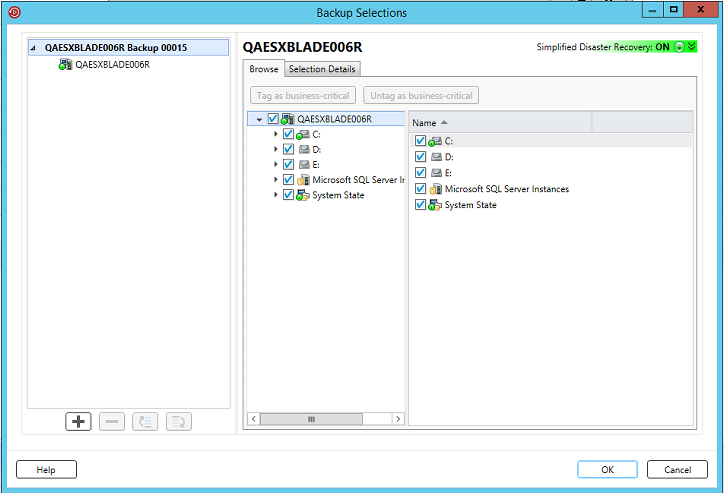
When the Simplified Disaster Recovery indicator for the backup selections is green, or ON, it indicates that the critical system components are selected for backup. The backup is SDR-enabled. If the indicator is gray, or OFF, then the backup is not enabled for SDR. You can click the icon to select all of the necessary components for disaster recovery, or to disable disaster recovery for backups created by this job.
To ensure that a backup is enabled for Simplified Disaster Recovery, you can view the backup selections that appear when you create or edit a backup job.
To ensure that backups are enabled for Simplified Disaster Recovery
-
On the Backup and Restore tab, create a new backup job or edit an existing one.
-
On the Backup Definition Properties dialog box, on the selections pane, do one of the following:
-
Ensure that the icon to the left of the computer name is green.
-
Click Edit , and ensure that the icon on the right is green, and that the text indicates that Simplified Disaster Recovery is on.Note: If you hover the mouse over the icon, the text indicates whether the Simplified Disaster Recovery is on or off.
-
-
If the icon is not green, or if the text indicates that Simplified Disaster Recovery is off, click the icon and then select the option Select all necessary components for disaster recovery.
Figure: Simplified Disaster Recovery indicator is ON in the Backup Definition Properties dialog box

Figure: Simplified Disaster Recovery indicator is ON in the Backup Selections dialog box
More Information
Related information