
Configuring encryption for the connection to the Backup Exec Database
The Backup Exec Database contains sensitive information about your organization, including user account credentials and backed up data. Securing Microsoft SQL Server's connection to the Backup Exec Database is an important step in protecting your network from outside access. Microsoft recommends that you use SSL encryption any time data that is transmitted between SQL Server and an application travels across a network.
Data transmission between the Backup Exec services and the SQL instance can travel across the network in the following scenarios:
-
You configure the Backup Exec Database as a centralized database and it is located on a central administration server in a CAS environment. Data can also travel across the network in variations of this scenario, for example when you use a managed Backup Exec server or when you use shared storage.
-
You use a remote SQL instance for the Backup Exec Database so that the Backup Exec services must access the database across the network.
Backup Exec automatically enables SSL encryption if you use the default, local SQL Express instance called "BKUPEXEC". If you configure Backup Exec to use any other SQL Server instance, you must configure encryption yourself.
SQL Server uses certificates to encrypt data. You can generate your own certificates or you can let SQL Server use an automatically generated, self-signed certificate. By default, Backup Exec uses the self-signed certificates that SQL Server automatically generates. However, Veritas recommends that you create and use your own certificates for additional security.
Note: Using encryption may affect the performance of communications between SQL Server and the Backup Exec Database. It involves an extra round trip across the network as well as time to encrypt and decrypt the data.
Refer to the Microsoft knowledge base for more information about Secure Sockets Layer (SSL) and encrypting connections to SQL Server.
To generate and install certificates for secure SQL connections (optional)
You can use your own certificates or you can let SQL Server use an automatically generated, self-signed certificate. Veritas recommends that you use your own certificates for improved security. Once you have generated and installed your certificate, you can proceed to configure the secure SQL connection to the Backup Exec Database.
Microsoft has requirements that must be followed when you use your own certificates for SQL Server. Certificates can be either self-signed or issued from a certification authority. Certification authorities can be either a local authority in your organization's domain or a known third-party authority.
For more information about Microsoft's certification requirements, refer to the following Microsoft article:
Before you configure encryption, you must import the certificates that you want to use into the local certificate store of the computer that hosts the Backup Exec Database.
For more information about importing and installing a certificate on the server, refer to the following Microsoft article:
When you import certificates, you should use the same user account under which the SQL Server service runs:
-
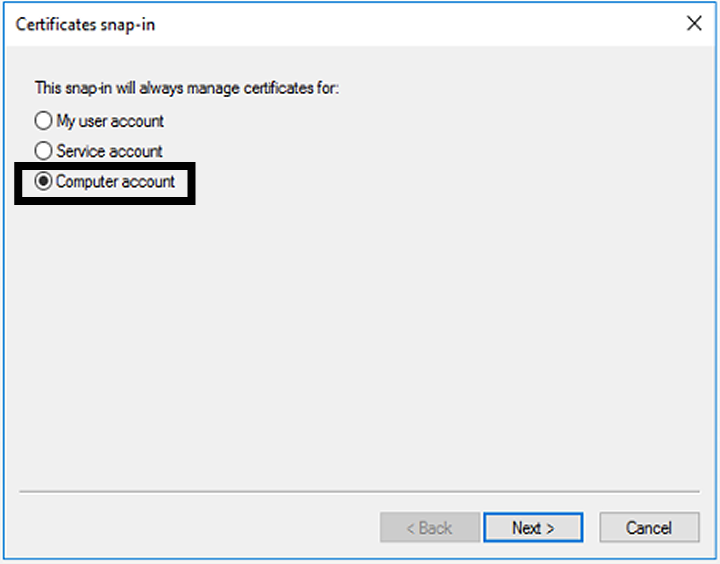
If the SQL Server is running under a default computer account such as LocalSystem, NetworkService, or LocalService, then you should use the Computer account option when you import the certificate. Selecting to manage certificates for the computer account ensures that the certificate is placed under the Personal store of the default computer account.
-
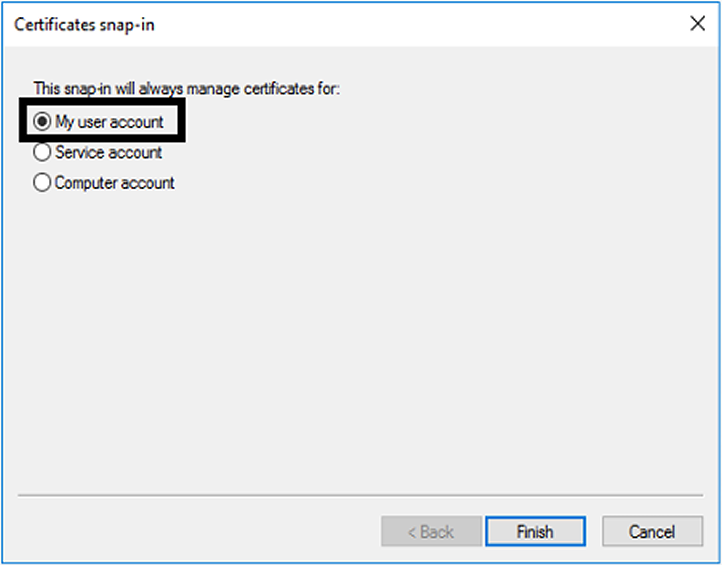
If the SQL Server is running under a specific domain account, you must be logged in using the same domain account to import the certificate. When you log into the Microsoft Management Console, select the My user account option. Selecting to manage certificates for the user account ensures that the certificate is placed under the Personal store of the user who is also running the SQL service account.
To configure secure SQL connections to the Backup Exec Database
Backup Exec automatically enables encryption for SQL connections if you use the default, local SQL Express instance called "BKUPEXEC". If you configure Backup Exec to use any other SQL Server instance, you must configure encryption yourself. You should configure the secure connection on the computer on which the SQL instance hosts the Backup Exec Database.
In some Backup Exec environments, you may need to configure the secure connection more than once:
| For clustered Backup Exec environments | You must configure a secure SQL connection on each node in the cluster. |
|---|---|
| If the cluster has not been created yet, configure the secure SQL connection before you run the Cluster Configuration Wizard in Backup Exec. | |
| If the cluster has already been created: | |
| - Bring the Backup Exec cluster offline using Windows Failover Cluster Manager. | |
| - Complete the following procedure on each node in the cluster. | |
| - Bring the Backup Exec cluster online using Windows Failover Cluster Manager. | |
| For Central Admin Server feature (CAS) environments | You must configure a secure SQL connection on each computer in the CAS environment, including the central administration server and any managed Backup Exec servers. |
Use the SQL Server Configuration manager to edit the properties of the protocols for the server that you want to configure. If you want to configure encryption for the default, local database instance that Backup Exec installs, edit the Protocols for BKUPEXEC. Select the certificate that you want to use, if you created a certificate. Then select whether you want to force encryption for the database connection. When you have finished, restart SQL Server and the Backup Exec services from the Services Manager.
For more information or instructions for configuring encrypted connections for SQL, refer to the Microsoft knowledge base.
Related information