
How to use Backup Exec server pools in CAS
In a CAS environment, you can group multiple managed Backup Exec servers together into Backup Exec server pools. If you create a pool of managed Backup Exec servers, all of the pools on those managed Backup Exec servers are available for job delegation. If there are multiple devices attached to each of the managed Backup Exec servers in the Backup Exec server pool, you can create multiple, smaller pools that are made up of fewer storage devices. Use this method to send some jobs to a specific pool in the Backup Exec server pool, and send other jobs to a different pool in the same Backup Exec server pool.
Backup Exec server pools can contain multiple managed Backup Exec servers or just one managed Backup Exec server. A managed Backup Exec server can belong to more than one Backup Exec server pool. The central administration server can be used as a managed Backup Exec server and can be included in the Backup Exec server pool.
Any managed Backup Exec server or Backup Exec server in a pool must be able to access the destination device for the backup. If there is no intersection between the device and the managed Backup Exec server or Backup Exec server pools, the job does not run. The Jobs list displays the following status: Ready; No Backup Exec server available in Backup Exec server pool.
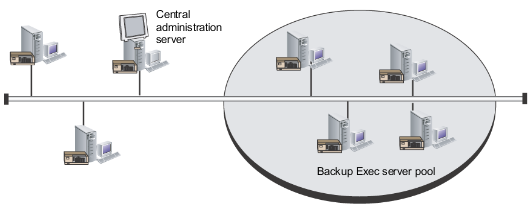
This graphic shows a Backup Exec server pool.
Figure: An example of a CAS-configured Backup Exec server pool inside a corporate network
Related information