
Backup networks
The backup network feature lets you direct any primary backup traffic that Backup Exec generates to a specific local network. Directing backup jobs to a specified local network isolates the backup data so that other connected networks are not affected when backup operations are performed. You also can use a backup network when you restore data. The feature is enabled on the Backup Exec server and lets you protect all the remote computers that reside on the specified local network.
When you specify a backup network and submit a job, Backup Exec verifies that the remote computer is on the same subnet as the selected interface on the Backup Exec server. If the remote computer is on the selected subnet, then the backup operation is performed.
If the remote computer is not on the selected subnet, then the job fails. However, you can set up Backup Exec to use any available network to back up remote computers.
The following diagram shows an example of a backup network configuration.
Figure: Example of backup network
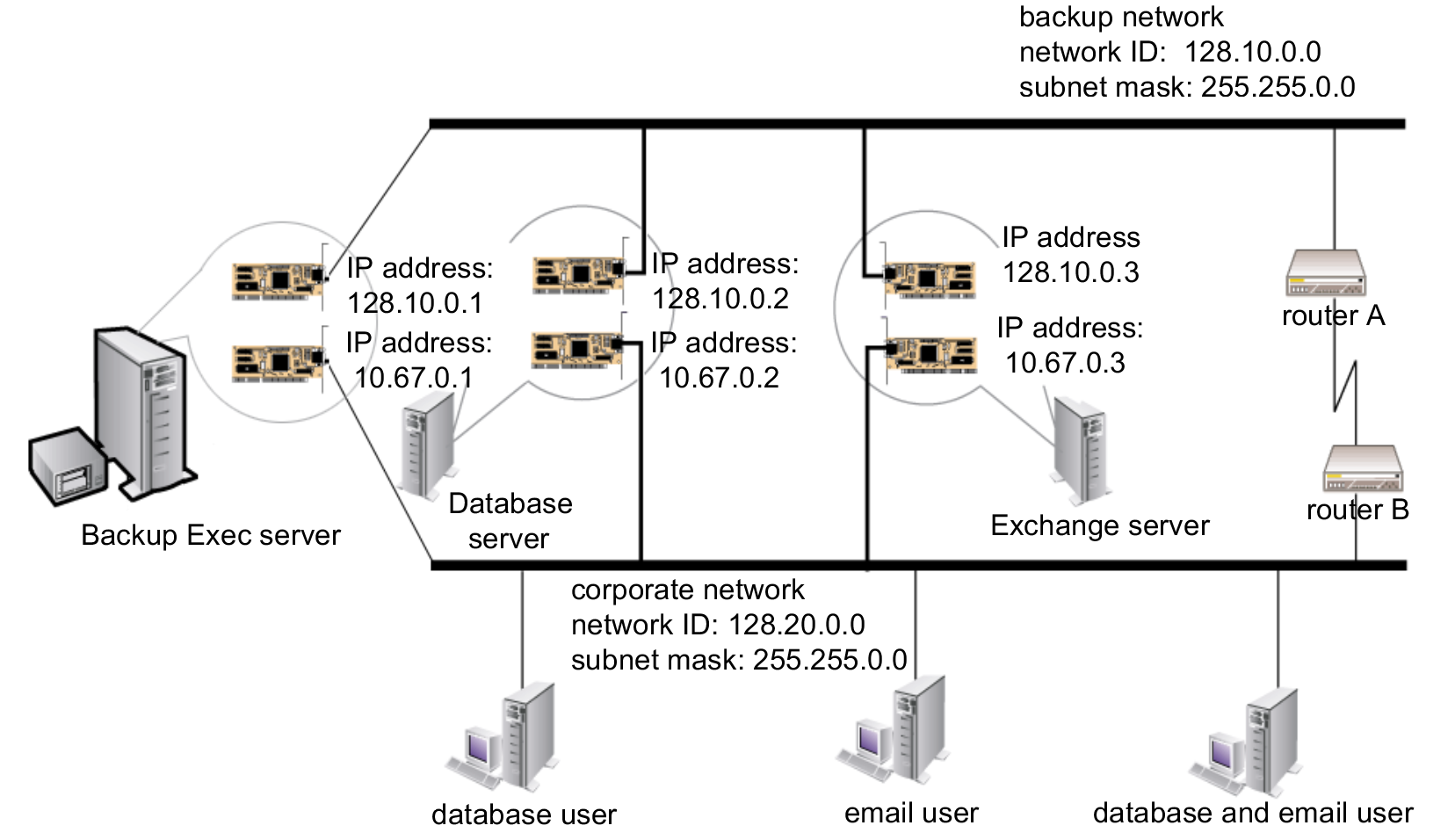
In the example, the database server and mail server are connected to both the backup network and the corporate network.
When the Backup Exec server performs backup operations, the backup data uses either the backup network or the corporate network to back up the database server. If the backup data goes through the corporate network, the amount of time it takes to back up the database server increases. The amount of time increases because the network route between the two computers is longer. Users may experience network latencies when they access the mail server since there is an increase in network traffic.
In contrast, if you specify a backup network and you back up the database server, the backup data traffic is isolated to the backup network. Any users accessing the mail server are not affected. The backup network is used to perform all backup operations, unless the remote computer is not connected to the backup network.
To back up any remote computers that are not connected to the backup network, choose to use any available network route. Choosing any available network lets you back up the remote computer even though it does not reside on the backup network.
You can configure global network settings for all backup jobs on the Network and Security pane in the Backup Exec settings. If you want to override the global settings for a particular backup job, you can configure network settings for individual jobs on the Network pane when you create backups.
Using IPv4 and IPv6 in Backup Exec
Backup Exec supports versions 4 and 6 of the Internet Protocol (IP), which are commonly referred to as IPv4 and IPv6. You can use IPv4 and IPv6 in backup and restore networks. Support for IPv6 is dependent upon operating system support for the protocol, as well as proper network configuration.
You can use Backup Exec in a mixed IPv4/IPv6 environment or an IPv4-only environment.
Enter an IPv4 or IPv6 address for a computer anywhere that you can enter a computer name in Backup Exec, except in the following location:
-
The Connect to Backup Exec Server dialog box.
A Backup Exec agent that supports IPv6 can be backed up or restored using IPv6 only from a Backup Exec server that is IPv6-compliant.
Related information