
About GDPR Guard
An organization may require to block some of the backed-up items for privacy and compliance reasons, such as General Data Protection Regulation (GDPR). These items should not be viewed or restored.
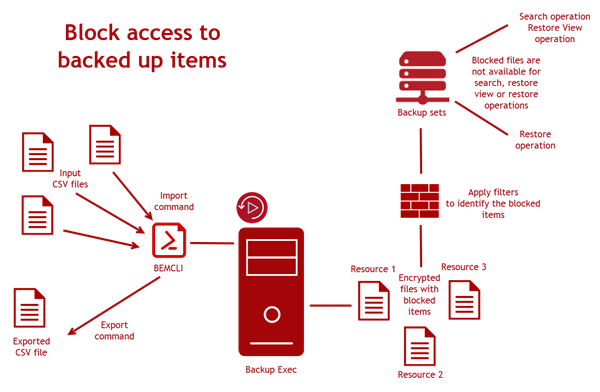
Backup Exec provides a way to import the list of items to block. You can use the GDPR Guard feature to specify the list of backed-up items whose access needs to be blocked.
An organization can use any tool to create a list of the blocked items. Backup Exec take this list in the form of a CSV file. The format of the CSV file used for specifying blocked items information during import is generic and can accommodate any CSV file generated by different tools.
To import the CSV file containing blocked items into Backup Exec, you must use the
Import-BEItemsToBlock BEMCLI command. You can import CSV files multiple times into Backup Exec and each CSV can contain blocked items from multiple servers.
You can export the content of all imported files into one CSV file using the
Export-BEItemsBlocked BEMCLI command.
After the blocked items are imported, the restore browse and search view do not display the blocked items. When you run a restore job, the blocked items are not available for restore. The blocked items continue to be part of backups and are not deleted from the backup media.
Backup Exec ensures that information about blocked items is protected using encryption and all operations that are related to blocked items are recorded in the audit log for compliance requirements.
When you run a restore job, you can use the Allow restore of blocked items option to restore blocked items. When you select this option, you must provide a reason to restore the blocked items and that is recorded in the audit log. Backup Exec allows only an SLA owner to restore the blocked items.
Following are the key features of GDPR Guard:
-
Blocked items cannot be viewed or restored from the Backup Exec console.
-
Backup Exec ensures integrity and protection of the blocked items data.
-
The file format that is used for blocked files operations (import and export) is CSV, which is an accepted and easy to use format. A CSV file supports all types of character encoding.
-
All operations that are related to blocked items are recorded in audit logs and Windows event log, which can be used for compliance requirements.
-
The imported blocked items on Central Administration Server (CAS) are auto-synced across all Managed Backup Exec Server (MBES)s that support blocking of items, ensuring blocking in the CAS-MBES environment without actually importing blocked items in each MBES.Note: The import command cannot be run on MBES. The export command can be run on CAS and MBES.
Figure: Workflow for blocking access to backed up items with GDPR Guard
Related information